ISTQB Certified Software Test Engineer

Wednesday, June 30, 2010

Installing Perl Plugin in Eclipse IDE

1.Open Eclipse ide. In menu bar we will find a tab called "Help"


2.In Help menu we will find a sub-menu called "Software updates".
3.In software updates we will find the "find and install" sub-menu.
4.Click on find and install.


5.Select the Radio button "Serach for new features to install" and click on next.

6.Click on New Remote site button which is present on the right side of the opened window.
7.Give the Name and update site url details in the popup that was opened and click on OK.
Name:"Some thing related to u r project"
URL:http://e-p-i-c.sf.net/updates--Older version of the plugin
http://e-p-i-c.sf.net/updates/testing--Newer version of the plugin.

8.The Name we have given should appear in update sites visit.

9.Check the check box before the name which we have given


10.Click on finish.
11.Update manager will run and the plug-in will be installed in eclipse.
12.Now restart the eclipse ide once the plug-in installed.
13.After the eclipse ide started,open Navigator,Click on NEWthen click on Other

13."New" windows will be opened and there we will find "Perl"folder.
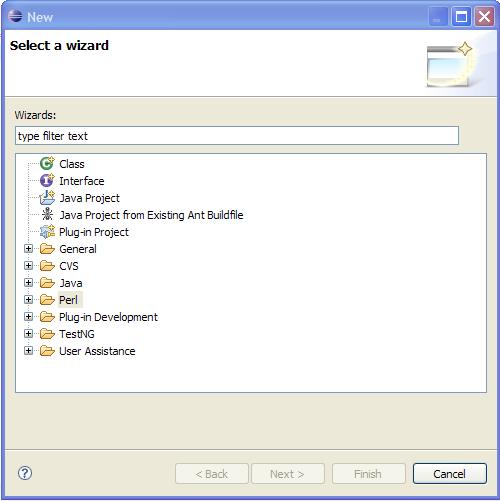
14.Click on perl and create a new project or file according to the requirement.

Thursday, June 10, 2010

Deleteing a service from services.msc

How to delete a service from services.msc?

Here is the process....

1.Open command prompt from run using "CMD" or "COMMAND".
2.Go to C drive in the command prompt.
3.Home directory should be C: Drive ,means "C:\>".
4.Use the command "sc delete "

for example if u want to stop apache server service,below is the syntax

"sc delete apacheserver"

Keep watching for more updates :)

Sunday, May 9, 2010

Keytool commands

keytool -alias selenium -import -file cybervillainsCA.cer -keystore selenium.keystore
keytool -printcert -file certfile.cer
keytool -list -keystore selenium.keystore
keytool -import -trustcacerts -file cybervillainsCA.cer

these are some of the important commands while generating keystore files

I will update more commands asap

Handling https using selenium

If we have a invalid ssl certificate or expired certificate configured with your tomcat server,it is not possible for selenium-Rc to handle https request until we add new SSL certificate to our server conf.xml.

So i found a solution to handle this.

1.In selenium RC directory we will find selenium server directory.In that directory we wil find SSL in which we will find a valid certificate.

2.Create a keystore file to import this certificate into that keystore file using the command in ur command prompt.

keytool -genkey -alias aliasname -keyalg rsa -keysize 2048 -keystore keystorename


3.It will ask for a password then give the password which u like
4.Then it will ask u for the details ,enter the details and again reenter the password
5.So in present working directory u wil find a keystore file.
6.Inport the certificate given by seleniium into this keystore file using command
keytool -keystore test -keyalg "RSA" -import -trustcacerts -file cybervillai
nsCA.cer

7.Now change the server.xml keystore property in conf dir of u r tomcat to point the created keystore file.
8.Now restart the server,and hit the url,then it will show certificate error and when u r trying to install the certificate,it has to show the seleinums certificate.
9.Install this certificate and restart the browser.
10.New certificate will be installed and it has to show a valid certificate.
11.If it is showing mismatched certificate address then in IE tools>Advanced>>security>>Uncheck the windows mismatch checkbox
12.Restart the browser.
13.And start using seleniumRC

Any doubts feel free to contact me

Sunday, April 18, 2010

ISTQB foundation level chapter wise weightage

ISTQB FL contains 6 chapters and among these 6 chapters ISTQB has given weightage.

1.Fundmentals of testing -7 bits
2.Testing throught out the life cycle-6 bits
3.Static analysis-3 bits
4.Dynamic test design techniques-12
5.TestManagement-8 bits
6.Tools for test design -4bitsing

U can clear the exam if u prepare 4,5,1 chapters.
Dont neglect 4 th chapter its an easy chapter,U can expect 3 questions from black box design techniques like
1.Equvialence Partitoning
2.BVA
3.Decision table
3 Questions from Whitebox techniwues like
1.Statement coverage
2.Path coverage
3.Branch decision coverage
Any doubts regarding these feel free to contact me

Selenium a Functional Testing tool

I think u already heard about a testing tool called "Selenium" from "Thought Works".A good tool consisting of three major components
1. Selenium IDE
2.Selenium Remote Control(RC)
3.Selenium Grid

A good tool used for regression testing.
The options provided by IDE are very flexible and make testers job easy while testing.
Refer the link http://seleniumhq.org/ for more details on selenium.

Download the 3 components from the downloads tab and go through the Documentation,then selenium is in ur hands.

Wednesday, March 24, 2010

ISTQB CERTIFICATION

The ISTQB is responsible for the international qualification scheme called "ISTQB Certified Tester". The qualifications are based on a syllabus, and there is a hierarchy of qualifications and guidelines for accreditation and examination. The ISTQB Foundation Level exam and the ISEB Foundation Exam became aligned as of 01-June-2006. ISEB, established in 1967 is the world's leading issuer of Software Testing qualifications and offers courses in over 50 countries worldwide.

ISTQB WEB SITE :www.istqb.org
INDIAN TESTING BOARD:www.istqb.in

ITB is the board which is looking ISTQB activities in INDIA.

With this certification u can be good at software testing.Apart from this it is good if u have some idea on tools like JMETER,Selenium etc...
See more details about istqb in the given site
Reference book for ISTQB:REX BLACK ,Foundations of software testing
I will post some resources for this exam soon